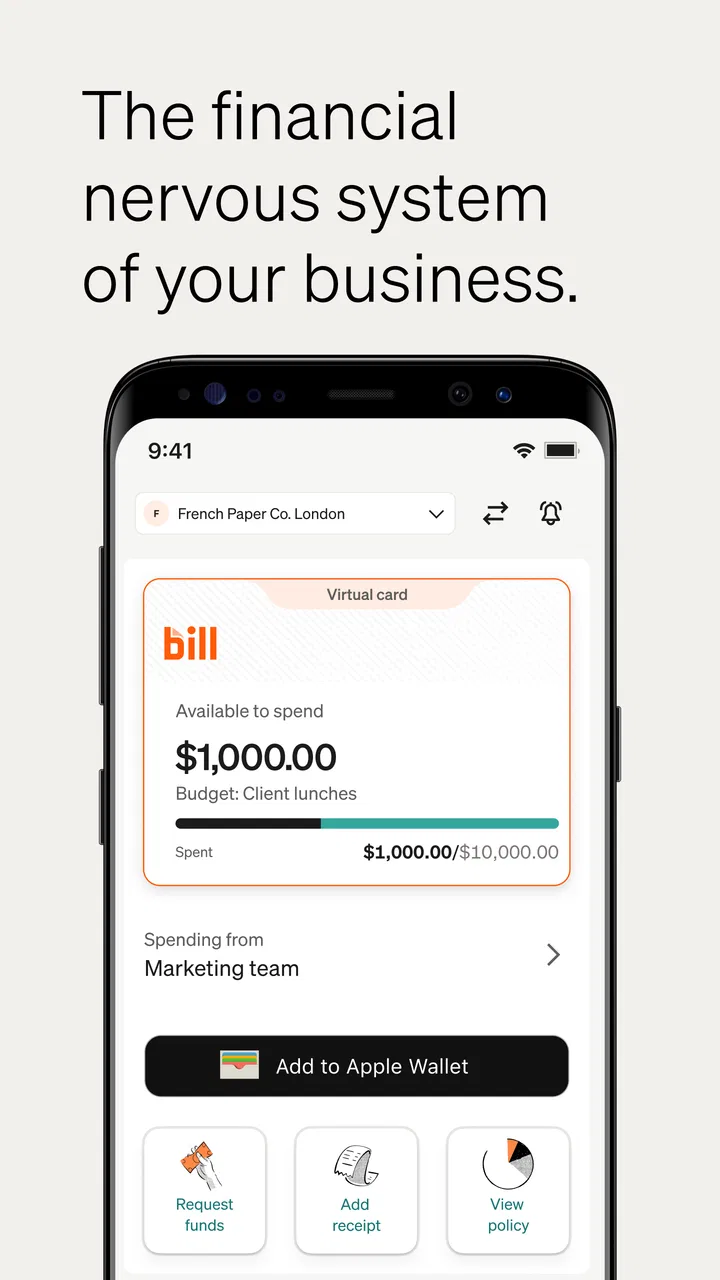
BILL Spend & Expense (Divvy)
- 4.5
- Rating
- 100.00K
- Installs
- Free
- Price

 Analysis by App-foxy
I approached BILL Spend & Expense as a practical business companion rather than another general finance app. Its focus is clear: helping teams handle corporate cards and expense management from a mobile device. That makes it most interesting when work is moving quickly, people are away from their desks, and a purchase needs to be recorded before the receipt disappears into a pocket or inbox.
The app comes from Bill.com Inc. and is available free of charge for Everyone. It fits the Business category, has passed the four-thousand-rating mark with an average of 4.5, and has attracted more than one hundred thousand installs. Those figures suggest a product with a real audience, but they do not tell me whether it will suit every company. In my experience, the important question is less “Is this a good expense app?” and more “Does its workflow match the way our team spends, approves, and reviews money?”
Where the connection matters most
The strongest part of a corporate spending tool is not simply displaying a balance. It is keeping the right information attached to a transaction while the context is still fresh. That is where connectivity shapes the experience. When I am using the app in a normal connected setting, the phone becomes a convenient point for checking spending activity and handling expense work without waiting to return to a computer.
You May Also Like

 Blood Strike: 2.5 Anniversary
Blood Strike’s Loadouts Turn Every Drop Into a Tactical Gamble
A close look at Blood Strike’s custom loadouts: how fast access to signature weapons reshapes its battle royale rhythm, rewards preparation, and narrows the gap between fights.

 Pandora - Music & Podcasts
Pandora’s Music Is Easy to Start, but Harder to Recover
Pandora’s strength is its low-effort path from a seed to a station. Its weak spot is how much confidence it asks you to place in connection, setup, and quiet recovery.

 8 Ball Pool
8 Ball Pool Is Built on Rivalries, Rematches, and Routine
A close look at the rivalries, rematches, shared routines, and unanswered safety questions that turn a quick pool match into a persistent mobile community.

 Samsung Music
Samsung Music’s Quiet Strength Is Playing What You Already Own
Its reach comes less from spectacle than from dependable access to a personal library. That simplicity is both the app’s strongest retention engine and its ceiling.

 AccuWeather: Weather Radar
AccuWeather Review: A Quick, Clear Forecast for Everyday Decisions
For everyday plans, the best forecast is the one you can understand quickly. AccuWeather makes rain timing, radar, and local conditions easy to act on, with a few trade-offs.

 Hill Climb Racing
Why Hill Climb Racing Still Turns Crashes Into One More Run
A tiny car, a bumpy hill and one more upgrade: Hill Climb Racing keeps resurfacing because its simple chaos makes every near-miss feel personal.
More From Our News Desk



A useful everyday scenario is a consultant buying supplies before visiting a client. The purchase happens away from the office, the receipt is easy to lose, and the reason for the expense may be obvious today but unclear two weeks later. A mobile workflow can make that moment more manageable because the user can deal with the transaction while remembering who or what it was for. The value is not merely speed; it is better detail at the source.
Connectivity also matters for teams that need current information rather than a manually maintained spreadsheet. A spreadsheet can be perfectly adequate for a very small operation, but it usually depends on someone collecting receipts, checking formulas, and asking colleagues to explain unfamiliar charges. A connected corporate card and expense environment is better suited to a company that wants spending activity to remain visible as work happens.
That convenience comes with a practical condition: the app is most useful when the phone can communicate with the service. In a basement meeting room, on a flight, in a rural area, or behind an unreliable guest network, I would not plan an important approval or assume that a receipt workflow will behave exactly as it does at home. The sensible habit is to treat the app as a connected work tool, not as a replacement for every paper-based fallback.
Why timing changes the quality of expense records
Expense administration often becomes difficult because the record is created too late. By then, the user may remember the amount but not the purpose, the people involved, or the project it belongs to. Using a phone near the time of purchase encourages a more complete record. This is one of the less obvious advantages of a mobile-first approach: it can improve the quality of information, not just reduce typing time.
I also see a benefit for managers. A manager reviewing a recent charge has a better chance of understanding it while the related trip, meeting, or purchase is still current. That can reduce the awkward back-and-forth that happens when an expense sits unexplained for too long. The app is therefore most valuable when the team agrees that spending should be documented promptly, rather than treating it as a monthly clean-up task.
There is a trade-off, though. Mobile convenience can make people rush. A hurried user may submit a vague note or attach the wrong receipt simply because the purchase happened during a busy moment. The app cannot replace a clear internal policy. I would give employees simple instructions about what information to capture and when, then use the mobile workflow to make compliance easier rather than expecting the interface to solve every process problem.
Using it in real mobile work
On a phone, the app makes the most sense for people who are actually moving: sales staff, field workers, consultants, owners visiting suppliers, and employees travelling for business. These users do not want to carry every expense until they reach a laptop. A compact business tool can fit naturally into the moment when a transaction happens, which is exactly when the details are easiest to remember.
For an employee, the first question is usually simple: “Can I deal with this purchase now?” For a manager, the question is different: “Can I understand and control this spending without being tied to my desk?” BILL Spend & Expense is aimed at both sides of that conversation. Its corporate-card and expense-management focus gives it a more specific job than a personal budgeting app, where the main concern is usually household money.
I would not confuse that focus with a universal accounting system. A personal finance app may be better for tracking bank accounts, savings goals, or household categories. A basic receipt scanner may be enough for a freelancer who only needs to archive documents for tax preparation. A spreadsheet may remain the simplest choice for a tiny team with very few transactions. This app becomes more compelling when the business needs a shared spending process rather than a private record.
A workflow I would recommend to a small team
I would begin with one narrow routine instead of asking everyone to change every finance habit at once. For example, employees could use the app for company-card purchases and handle each expense close to the time of purchase. Managers could then review the resulting information at a regular point in the week. This creates a clear connection between the card activity, the employee’s explanation, and the manager’s follow-up.
The non-obvious lesson is that adoption depends on the moment of use. If employees are told to open the app only after a long trip, the process will feel like administration. If they are encouraged to make a quick record while the receipt is in front of them, the same tool can feel like a small protective habit. I would test the routine with frequent travellers first, because they reveal connectivity problems, receipt-handling friction, and unclear instructions faster than desk-based users.
Another useful approach is to separate urgent actions from later review. A person standing outside a shop should not be expected to write an essay about a purchase. The immediate goal is to preserve the essential context. A manager can examine the wider pattern later, when there is time to compare related spending. This division keeps mobile use realistic and avoids turning every transaction into a lengthy interruption.
What happens when the network is unreliable?
This is where I would set expectations carefully. A connected expense service depends on communication between the phone and the service for current information and account activity. If the connection is slow, a screen may take longer to update, and a user may be unsure whether an action has completed. That uncertainty is especially uncomfortable around approvals or submissions, where tapping repeatedly can create confusion.
My practical advice is to avoid repeated taps when the network hesitates. Wait, check the visible state, and confirm the result when the connection improves. If the purchase is urgent and the app is not responding, keep the receipt and write down the purpose, project, and people involved. That is not a criticism unique to this product; it is a sensible recovery habit for any connected financial workflow.
I would also encourage teams to define what employees should do when they cannot complete an action immediately. A short internal rule—retain the receipt, note the business reason, and finish the record when connected—can prevent panic and duplicate submissions. The app may streamline the process, but the organization still needs a fallback procedure for poor connectivity.
Recovery is part of the user experience
Good expense management is not only about successful submissions. It is also about recovering from mistakes: a forgotten receipt, an unclear description, a duplicate attempt, or a purchase made while travelling. In my view, the best way to use this app is to treat the mobile entry as part of a larger review cycle. Capture the transaction promptly, then look back at recent activity when you have a stable connection and enough attention to correct details.
This two-stage habit is more reliable than trying to perfect every entry in a crowded airport or between meetings. It also helps managers distinguish a genuinely unusual purchase from a record that is merely incomplete. The trade-off is that users must remember to perform the second check. A notification or a visible task may help, but the team should not assume that mobile capture alone guarantees clean books.
For a business owner, recovery also means deciding who handles exceptions. If an employee cannot explain a charge, the issue should have a clear route rather than remaining buried in an activity feed. I would agree in advance on who reviews questionable transactions and how quickly employees should respond. That process decision may have more influence on the app’s success than the choice of phone model or office network.
Using mobile data sensibly
Because this is a business app, I would include it in the company’s normal mobile-data planning. Expense activity is usually more important than entertainment traffic, but users may still work in places where connectivity is limited or costly. Employees travelling internationally should know how their phones handle roaming before relying on any connected finance tool during a trip.
A sensible pattern is to use a trusted connection when one is available, especially when reviewing sensitive business activity in a public place. I would avoid making important decisions while distracted by a poor signal, and I would not treat an open public network as automatically appropriate simply because it is convenient. These are general digital-safety habits, but they matter more when the app is connected to company spending.
Data-conscious use is also about attention, not just megabytes. Opening the app repeatedly to check whether a transaction has appeared can waste time and create uncertainty when updates are delayed. I prefer a deliberate rhythm: record what needs recording, wait for the service to respond, and review the result later rather than constantly refreshing. That approach is calmer and reduces the chance of duplicate work.
For administrators, connectivity should be considered during onboarding. Ask employees where they actually use the app: in shops, on construction sites, in taxis, at airports, or inside client buildings. A process that works perfectly in an office test may fail at the real point of purchase. The most useful pilot is therefore not a desk demonstration; it is a short trial with people in the field, including at least one location where the network is less dependable.
Who will get the most from it?
I think the app is a strong candidate for businesses that issue corporate cards and want spending and expense work to stay connected to those purchases. It is particularly suitable when several employees spend on behalf of the company and managers need a clearer view than a pile of receipts can provide. The mobile angle is valuable when staff are rarely at their desks.
It may also suit a growing team that has outgrown informal messages and shared spreadsheets but does not want employees carrying the entire process in their heads. The free price makes it easy to investigate without treating the first test as a large software purchase. Still, “free” does not remove the cost of training, policy design, review time, or correcting poor records. I would judge the app by the time it saves and the visibility it creates, not by the download price alone.
I would skip it if the business has no need for corporate-card oversight, if expenses are extremely rare, or if the team already has a well-established accounting workflow that everyone follows consistently. A personal finance app is a better match for household spending, while a dedicated accounting platform may be more appropriate for a company that needs a broader financial system than card and expense management. Choosing a specialized tool only makes sense when its specialization addresses a real problem.
Compatibility and practical expectations
The current version is 4.0.17, and the app requires operating system version 12 or later. That requirement is important for teams with mixed devices. Before asking employees to install it, I would check the phones they actually use rather than assuming that every company-owned or personal device will qualify. A single unsupported phone can push an employee back into email and paper, weakening the consistency the app is meant to create.
The Everyone content rating makes the app broadly suitable from an age-classification perspective, but business suitability still depends on the role of the user. An employee who only needs to record purchases may need a simpler introduction than a manager responsible for reviewing spending. I would tailor training to each role and explain the reason behind the process, because people are more likely to complete expense work when they understand how it helps the team.
The app’s public reception is encouraging, with a 4.5 average from around 4.3 thousand ratings and 555 reviews. I treat that as a useful signal rather than a guarantee. A finance workflow can feel excellent to a travelling team and unnecessary to a small office with almost no card activity. Reviews cannot replace testing the actual approval habits, network conditions, and device mix of a particular business.
My connectivity verdict
After looking at the app through the lens of real mobile work, I see BILL Spend & Expense as most useful when a company wants employees to deal with corporate-card spending close to the moment it happens. Its strength is the connection between a purchase and the information needed to understand that purchase later. That can make expense reviews less mysterious and reduce the slow accumulation of receipts.
The main limitation is equally clear: this is not a tool I would treat as independent of connectivity. Users should plan for delayed responses, weak signals, travel conditions, and the occasional need to record details temporarily outside the app before completing the workflow. A team that prepares for those moments will have a much better experience than one that assumes every transaction occurs on a strong office network.
Compared with a spreadsheet, it offers a more natural fit for distributed spending. Compared with a personal budgeting app, it is aimed at company activity rather than household finances. Compared with a full accounting system, it is narrower and potentially easier to introduce when the immediate problem is corporate cards and expenses. That positioning is both its appeal and its boundary.
My recommendation is to try it with the employees who spend money away from their desks, establish a simple capture-and-review routine, and test it in the places where those employees actually work. If the trial shows that the team can preserve receipts, explain purchases, and recover calmly from connection problems, the app is worth keeping in the business toolkit. If the company needs broad accounting, household budgeting, or a process that works without any network planning, another option will be a better fit.
For the right team, BILL Spend & Expense is less about checking a transaction and more about keeping spending understandable while work is still happening. That is a modest promise, but in a busy business it can make a meaningful difference.
FAQs for BILL Spend & Expense (Divvy)
01What is BILL Spend & Expense (Divvy), and who is it designed for?
BILL Spend & Expense, formerly known as Divvy, is a business spending and expense management platform designed for companies, finance teams, managers, and employees. It combines corporate cards, budgets, expense tracking, receipt collection, approvals, and reporting in one system. It is mainly intended for business use rather than personal budgeting, so access and available features usually depend on an employer’s account and permissions.
02Can employees use the app to manage company expenses and submit receipts?
Yes. Employees can generally use the mobile app to view assigned spending limits, make approved business purchases, capture receipts, and submit expense information for review. The app is particularly useful for recording expenses immediately after a transaction, reducing the need to keep paper receipts. However, the exact submission process, required fields, and approval rules may vary according to the company’s configuration.
03Does BILL Spend & Expense include a corporate card or spending controls?
The platform can include corporate card functionality and configurable spending controls, depending on the company’s plan and setup. Administrators may be able to create budgets, assign funds, establish merchant or category restrictions, and monitor transactions as they occur. These controls can help prevent unauthorized spending, although users should confirm with their employer which card features are enabled before relying on the app for payments.
04Is BILL Spend & Expense free to download and use?
Downloading the BILL Spend & Expense app may be free from the App Store or Google Play, but access to its business features is generally connected to a company account, subscription, or employer invitation. Individual users may not be able to create a fully functional account independently. Pricing, card costs, plan limits, and available tools can change, so businesses should check BILL’s current terms and confirm billing details before signing up.
05Is BILL Spend & Expense safe for handling financial and company information?
BILL Spend & Expense is built for managing business transactions, receipts, budgets, and employee spending data, so security is an important part of its use. Users should protect login credentials, enable available security options, and avoid accessing the account on unsecured devices or networks. Before downloading, companies should review BILL’s privacy policy, permissions, data practices, and administrative controls to ensure they meet internal compliance requirements.
Pros
- Real-time card controls help businesses manage employee spending.
- Automated receipt matching reduces manual expense-reporting work.
- Custom spending limits can be tailored to teams
- projects
- or merchants.
- Dashboard gives finance teams visibility into budgets and transactions.
- Useful integrations can connect spending data with accounting workflows.
Cons
- Most features are designed for businesses
- not personal budgeting.
- Approval and policy setup may take time for smaller teams.
- Some advanced tools may depend on the selected subscription plan.
- Employees may need training to follow digital expense procedures.
- Availability of certain features can vary by region or company settings.

BILL Spend & Expense (Divvy)
Gallery